Manufacturing
 Logistics
 Real Estate
 Retail
 Finance
 Healthcare
 Hospitality
 Automotive
What is an enterprise search engine? A guide to AI-powered information access
Listen to the article
In many organizations, valuable time is lost each day as employees search for information dispersed across emails, cloud storage, collaboration platforms, and legacy systems. Whether it’s a buried Slack message, a forgotten document in Google Drive, or an old Jira ticket, the hunt for internal knowledge costs valuable time and productivity. In fact, executives and their teams spend approximately 25% of the workweek searching for information, significantly impacting overall productivity. Enterprise search engines solve this by creating a single point of access to all enterprise knowledge—searching across emails, documents, chats, and apps in one go.
This article explores what enterprise search engines are, how they work, why they matter, and the emerging role of AI in making search smarter, faster, and more useful. We will also introduce ZSearch—a modern, AI-powered enterprise search solution that’s redefining how organizations discover and use knowledge at scale.
- What is an enterprise search engine?
- Benefits of enterprise search
- How enterprise search works
- Key features and capabilities of enterprise search solutions
- The role of AI in modern enterprise search
- Challenges and best practices in implementing enterprise search
- Introducing ZSearch: ZBrain’s AI-powered enterprise search for AI-enabled workplace
- Conclusion
What is an enterprise search engine?
An enterprise search engine is a specialized software that enables users to securely search and retrieve information from across an organization’s internal data sources and systems. Unlike a public web search engine (which indexes internet content), an enterprise search is focused on private, company-specific content – from documents and spreadsheets to emails, Slack messages, support tickets, databases, and more. The primary goal is to let employees quickly find the exact knowledge they need to do their jobs, without manually digging through multiple applications or asking co-workers for help.
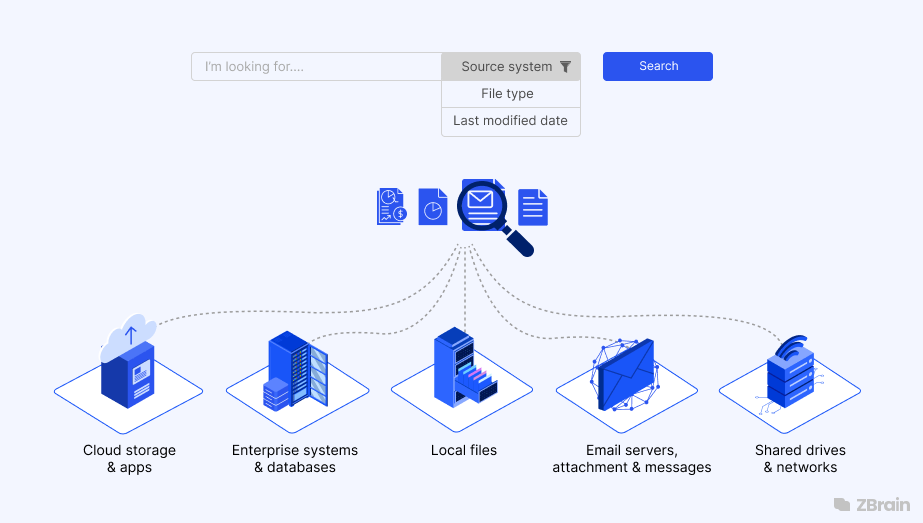
Think of enterprise search as a unified search bar for all your corporate knowledge. It connects to various data repositories and applications, indexing their contents so that a query can be run against everything at once. For example, instead of separately searching your email, then your SharePoint, then your cloud drive for a file, you can enter a query once and instantly retrieve results spanning all these sources. This breaks down information silos and ensures critical knowledge is available on-demand across departments.
Enterprise search engines are built to handle the complexity of enterprise environments. They often incorporate stringent security controls so that users only see results they have permission to access (respecting roles and access levels). They also account for the myriad formats and data types in a company, often able to index everything from Word documents and PDFs to database records, chats, and even audio transcripts. Advanced enterprise search solutions go beyond simple keyword lookup – using techniques like natural language processing and semantic analysis to understand intent and context, yielding more accurate results than a basic text search.
Benefits of enterprise search
Implementing an enterprise search solution can have transformative benefits for an organization. Here are some of the key advantages:
-
Improved productivity and efficiency: Across Fortune 500 companies, inefficient search processes result in an estimated 2.4 billion hours wasted annually on locating information. Enterprise search dramatically reduces the time employees spend looking for information, allowing them to focus on higher-value tasks. Instead of wasting hours each day hunting through emails or file shares, staff can retrieve what they need in seconds. Faster information access means work gets done quicker. For example, a law firm using enterprise search can instantly pull up relevant case precedents and documents, enabling lawyers to provide timely advice instead of manually digging through archives.
-
Better collaboration and knowledge sharing: When knowledge is easy to find, it’s easier to share. Enterprise search breaks down data silos between teams by making documents, conversations, and expertise from different departments discoverable company-wide. Employees can learn from past projects and reuse knowledge instead of reinventing the wheel. This enhanced transparency fosters a more collaborative culture and prevents redundant work. For example, a healthcare organization might use enterprise search to let doctors and researchers collectively access a repository of medical protocols and research papers, improving patient care through shared insights.
-
Informed decision-making: Quick access to comprehensive and up-to-date information leads to more data-driven decisions. Enterprise search aggregating data from multiple systems gives managers a 360° view – they can pull metrics, reports, customer feedback, etc. on-demand to inform strategy. By uncovering patterns and connections across different datasets, a good search engine can even surface insights (for example, spotting a trend in customer complaints or sales figures) that might otherwise remain hidden. In short, enterprise search turns raw data into a strategic asset for better decisions.
-
Reduced data silos and duplicates: In many companies, important knowledge is isolated in different tools (SharePoint vs. Google Drive, different team wikis, personal folders, etc.). According to Atlassian’s State of Teams 2025 report, more than half of knowledge workers (56%) say they frequently need to schedule a meeting or reach out to a colleague directly just to access the information they need. An enterprise search engine helps eliminate these silos by indexing all content into one system. This not only makes information easier to find, it also highlights when duplicate or conflicting data exists, helping improve data consistency. By centralizing knowledge, organizations can maintain a single source of truth and uphold data integrity.
-
Enhanced customer service and experience: Enterprise search doesn’t just help employees – it can also improve customer-facing interactions. Support agents, for instance, can quickly search internal knowledge bases and past tickets to resolve customer issues faster. Some enterprise search tools also power self-service portals or site searches that let customers find answers on their own. By delivering accurate information more quickly, search contributes to higher customer satisfaction and loyalty.
-
Compliance and risk mitigation: Finding the right information at the right time is crucial for compliance (e.g. locating specific records during an audit or legal discovery). Enterprise search systems help ensure no critical document is overlooked when needed. Moreover, robust permission controls and audit logs in enterprise search software help organizations enforce data access policies and track who accessed what, supporting security and compliance requirements (HIPAA, GDPR, etc.). In other words, enterprise search not only finds information, it also helps control its proper use.
-
Cost savings: All the above benefits ultimately translate into cost reduction. Saved time is saved money, which an effective enterprise search can recoup. By resolving customer queries faster, companies can reduce support costs. By reusing knowledge assets, they avoid duplicate project spend. And by improving decisions, they avert costly mistakes. These efficiencies mean an enterprise search solution often delivers a strong ROI despite the upfront investment.
In summary, enterprise search engines make employees more self-sufficient, collaborative, and effective by ensuring that needed information is always at their fingertips. In today’s fast-paced business environment, that quick access to knowledge can be a true competitive advantage
Streamline your operational workflows with ZBrain AI agents designed to address enterprise challenges.
How enterprise search works
At a high level, enterprise search operates through a pipeline of collecting, processing, indexing, and retrieving data from various sources. When a user enters a query, the system searches its index and returns relevant results ranked by relevance. Let’s break down the key components and processes involved:
-
Connecting to data sources (Content awareness): The first step is to collect or ingest data from all the repositories that contain enterprise knowledge. This is done via connectors or crawlers that link the search engine to each source: file servers, cloud drives, email systems, wikis, CRM databases, ticketing systems, Slack or Teams chats, etc. The search engine either periodically crawls these sources to pull new data, or uses APIs/webhooks for real-time syncing. Modern search solutions offer a library of pre-built connectors (for popular tools like Google Drive, SharePoint, Salesforce, Jira, GitHub, etc.) and/or APIs to connect custom data sources. This content awareness phase ensures the search engine knows what data is out there across the enterprise.
-
Content processing and analysis: Once connected, the system processes each item to extract text and metadata and make sense of the content. This may include parsing documents, reading database fields, extracting keywords, detecting languages, identifying entities (names, dates, etc.), and generating metadata like author, creation date, file type, etc. Some advanced systems even use content analysis to classify documents or recognize if two files are related. For example, transcripts of meetings might be analyzed to tag speakers and topics. This processing stage enriches the raw data so that the search can be smarter.
-
Indexing: After processing, the content is organized into an index, which is essentially a structured data representation optimized for fast search lookups. The index might be a combination of traditional inverted indices (for keyword search) and more modern vector indexes (for semantic search). During indexing, the system will also enforce security filters by tagging each document with permissions/roles (so it knows who can see it). Indexing is a continuous process; as new content arrives or changes, the search engine updates the index (some systems do this in real-time or near-real-time so the index is always fresh). A scalable enterprise search can handle large volumes of data and keep the index updated from many sources without significant lag.

-
Query processing: When a user submits a search query (which could be a few keywords or a full natural-language question), the enterprise search engine first interprets the query. This query processing step may involve correcting spelling, expanding acronyms, or applying NLP to understand the intent if it’s a question. Advanced systems use natural language processing to parse questions in everyday language (e.g. “find the budget report from last Q3”), rather than relying on exact keyword matches. The query processor might also augment the query with synonyms or related terms, and apply the user’s permission scope (so it only searches content users are allowed to see).
-
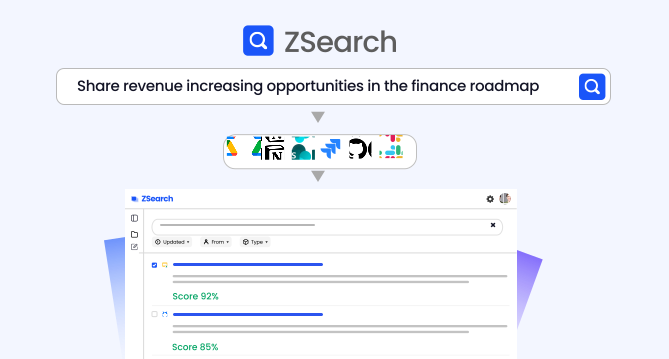
Matching and ranking: After verifying the user’s access permissions, the search engine matches the query against authorized content and ranks the results. Ranking algorithms consider factors such as text relevance, recency, popularity among the user’s peers, and past interaction history—strictly within the scope of accessible content. The output is a list of permitted results—documents, files, messages, etc.—typically displayed with highlighted snippets. Enterprise search engines like ZSearch also offer filters (by date, source, author, file type, etc.) so users can refine the results further.
-
Result display and actions: The final step is delivering the results in an intuitive interface. A good enterprise search engine provides a unified search results page that might categorize results by source or type (emails vs documents vs tickets, for example) or allow the user to toggle views. Users can then click results to open the item in its native app, or sometimes interact directly (e.g. quick preview of a file, or basic actions like approving a ticket). Some search tools even let you perform actions from results (e.g. reply to a message, share a file) right from the search interface, further streamlining workflow. The best solutions also ensure that search respects context and permissions.
Behind the scenes, an enterprise search engine comprises these building blocks working in concert: connectors, analyzers, index storage, query parsers, and ranking algorithms. In deployment, you might have search servers or a cloud service running these components, and sometimes a separate administration console for search administrators to monitor indexing status, tune relevance, and manage connectors/security.
Many enterprise search platforms today provide these capabilities out-of-the-box so that organizations don’t have to build a search engine from scratch. However, tuning and configuring the system for your specific data and needs is a big part of a successful implementation.
Key features and capabilities of enterprise search solutions
Not all enterprise search engines are equal – but the most effective ones tend to offer a common set of core features that enhance search accuracy, usability, and security. When evaluating or designing an enterprise search solution, consider the following key capabilities:
-
Broad connectors and data compatibility: The value of search is only as good as the data it can reach. Top enterprise search tools provide connectors to a wide range of enterprise systems – from file storage (e.g. Google Drive, SharePoint, Box) and productivity apps (Slack, Teams, Confluence) to CRM/ERP databases and even legacy systems. Ensure the search engine can seamlessly integrate with all the data repositories your organization uses (structured and unstructured). This often means support for various file formats (Office docs, PDFs, emails, etc.) and database connectors or APIs to pull records. A truly unified search should span cloud apps, on-prem data, and anything in between. Moreover, connectors should be secure and respect privacy – e.g. using read-only access and not exposing sensitive data beyond the index. A thorough inventory of your data sources is a first step to assess compatibility.
-
Intuitive search experience: User adoption is critical – employees will only use the tool if it’s easy and helpful. A clean, familiar interface (often just a simple search bar with filters) and features like auto-suggestions, spell-check, and instant previews make the search experience friendly. Many enterprise search UIs support faceted search, where users can drill down by attributes (date ranges, author, project, etc.), and sorting options (by relevance, date). Another helpful feature is predictive or recommended results – for example, as you type a query it might suggest popular queries or relevant content (similar to Google’s auto-complete). Modern solutions leverage AI to provide personalized suggestions, like recommending content or experts related to your search context. The easier and smarter the search UX, the more people will use it – so prioritize features that enhance usability (mobile access, natural language query support, etc.).
-
Multiple search techniques: Different search scenarios call for different techniques – so the engine should support a mix of search modes. This includes traditional keyword-based search (exact matches, phrase search), fuzzy search (to handle typos or similar terms), faceted navigation (filtering by metadata), and increasingly semantic search using AI. Semantic search means the engine understands the meaning of your query, not just the literal words – for instance, knowing that “CEO” is related to “Chief Executive Officer” or that a query for “sales growth” might relate to revenue data even if the word “growth” isn’t in a document. Many modern enterprise search products use vector embeddings and machine learning to enable semantic matching beyond keywords. Additionally, natural language question answering is a key capability now (e.g., you ask in full sentence and the system figures out the intent). The best solutions combine approaches – sometimes called hybrid retrieval – using keywords and vectors together for optimal results. When evaluating, look for flexibility: can the search engine do both precise term matching and broader concept-based retrieval? This ensures users find what they need even if their search terms don’t exactly match the document wording.
-
Relevance tuning and smart ranking: Out-of-the-box ranking algorithms might not perfectly fit your organization’s notion of what’s “relevant.” Good enterprise search software provides relevance tuning capabilities – either manual controls or machine-learning-driven ranking. This could include boosting certain content (e.g. always rank official policy documents higher than informal notes), weighting newer content over old, or personalizing results based on a user’s role or past behavior. Increasingly, AI is used to learn from click behavior and refine relevance automatically. Also, support for synonyms and taxonomy is useful – e.g. configuring that “NYC” and “New York City” should be treated equivalently or mapping internal code names to project names. Having analytics helps administrators adjust the search relevance over time to continuously improve result quality. Smart ranking ensures that the most useful results float to the top, even as content and user needs evolve.
-
Robust security and access control: Enterprise search must strictly enforce permissions, since it’s aggregating potentially sensitive information. A key feature is role-based access control (RBAC) or even attribute-based control, so that search results are filtered to each user’s clearance. The search index should store and respect document-level permissions from source systems (so if a file is confidential to HR, it never appears to a non-HR person’s search). Additionally, the system should support single sign-on and identity integration so that user credentials and groups are in sync with corporate directories. Beyond access control, look for data protection measures: encryption of data at rest and in transit, audit logs of search queries and accesses, and compliance with data regulations. Some advanced tools even allow redaction or masking of certain data in search results for privacy. Security isn’t optional – a good enterprise search engine is secure by design, ensuring that making data searchable doesn’t equate to exposing it inappropriately.
-
Analytics and insights: Administrators can greatly benefit from insights into how search is being used. Many enterprise search platforms include analytics dashboards showing metrics like top search queries, zero-result queries, click-through rates, and user engagement. These search analytics help identify content gaps (e.g. many people search for “XYZ policy” but find nothing – maybe that content doesn’t exist or isn’t indexed) and opportunities to improve. Analytics also measure the impact – for example, tracking if average time to find information decreases after implementing search engines (success rates). Look for the ability to generate custom reports and integrate with business intelligence tools if needed. The ultimate goal is using data to continuously optimize the search experience (tweaking relevance, adding new connectors for popular search needs, etc.).
-
Scalability and performance: In a large enterprise, the search system might need to index millions of documents and serve thousands of queries per day. The architecture should be scalable – either via distributed indexing (sharding the index across servers) or a cloud-managed service that scales behind the scenes. Features like real-time indexing (so new content is searchable within minutes or seconds) can be important for fast-paced environments. Also consider deployment flexibility – some organizations need on-premises search for compliance, others prefer cloud – leading solutions often support both, or hybrid modes. Performance-wise, users expect quick results (sub-second query responses). Ensure the solution can handle your data volume with room to grow, without choking on indexing or slowing down query times.
-
Customizability and extensibility: Every enterprise has unique needs, so it helps if the search platform is customizable. This could mean the ability to define custom metadata, adjust the indexing pipeline (e.g. adding a step to sanitize or transform data), or integrate custom ranking algorithms. Many enterprise search products offer APIs and SDKs so developers can build custom search applications or embed search in other tools. For example, you might want to embed the search bar in an intranet portal, or build a chatbot that uses the search engine under the hood for Q&A. A flexible platform will also allow UI customization – branding the search interface or tweaking the layout to fit your intranet style. Essentially, look for a solution that can bend to your workflows, rather than forcing you to adapt to it.
As you evaluate solutions, it’s wise to prioritize the features that align with your primary use cases – for instance, if your main goal is employee self-service Q&A, then NLP and AI Q&A capabilities might weigh more heavily; if you operate in a highly regulated industry, then security and audit features might top the list.
The role of AI in modern enterprise search
We are in the midst of an AI revolution in search technology. Traditional enterprise search was largely keyword-based – effective, but often requiring the user to try multiple queries or know exactly which terms to use. Today’s AI-powered search systems are far more intelligent: they understand natural language, learn from user behavior, and can even generate answers by synthesizing information from multiple sources. Here are some of the ways artificial intelligence is transforming enterprise search:
-
Natural Language Processing (NLP) for queries: Modern enterprise search engines leverage NLP to allow users to ask questions or describe what they need in plain language, rather than using exact keywords. For example, you could ask “Show me all the design specs updated last month” and the engine will parse that for intent (you want documents of type design spec, modified in the last month) and execute the appropriate search, even if those exact words aren’t in the files. NLP enables the system to handle synonyms, understand plural/singular, and recognize the query’s context. This makes search more intuitive and human-friendly, especially for non-technical users who may not know the precise jargon to search. The result is a higher likelihood the first query brings back what the user needs.
-
Understanding user intent and context: Beyond the literal query, AI helps interpret intent. Is the user looking for a specific document (navigational query) or trying to research a topic (informational query)? AI models can infer this from the phrasing and past patterns. Additionally, machine learning uses context like the user’s role, department, or recent activities to tailor results. For instance, if a salesperson types “Q4 report”, the system might assume they mean the Q4 Sales Report, whereas an engineer might see Q4 Engineering OKR Report first – based on what each role typically accesses. By factoring in who is searching and their context, AI-infused search delivers more personalized and relevant outcomes. This contextual awareness grows over time as the system learns from user interactions.
-
Semantic search with vector embeddings: A major advancement is the use of vector embeddings to represent the semantic meaning of documents and queries. Instead of just matching keywords, the engine can find conceptually related information. For example, a query for “COVID policies” could still find a document titled “Pandemic office guidelines” because a semantic search model knows those concepts are related even though the exact words differ. Vector-based semantic search greatly improves recall for unstructured content – you get relevant results that you might miss with strict keyword matching. Many platforms now integrate a vector database alongside traditional indexes to enable this hybrid search approach. The bottom line: AI allows the search engine to understand content more like a human would, not just as text strings.
-
Intelligent recommendations and proactive search: AI can surface information before you even explicitly search for it. For instance, it might notice you frequently collaborate with certain colleagues and start suggesting their documents for relevant queries. Or it might observe that many users who searched for “onboarding” also accessed a particular HR policy, so it promotes that policy in future results (collaborative filtering). Some enterprise search software provides recommendation widgets on intranet homepages – “Suggested for you: documents related to X” – based on your activity or organizational trends. This turns search into more of a two-way discovery tool: you not only pull information with queries, but the system pushes useful knowledge to you. By analyzing usage patterns, AI can identify relevant content that users may not have thought to search for, improving discoverability and supporting more informed decision-making.
-
Answer extraction and summarization (generative AI): Perhaps the most game-changing AI capability is the ability to produce direct answers or summaries using generative AI, rather than just returning documents. This is often achieved via Retrieval-Augmented Generation (RAG) techniques. Essentially, the search engine will retrieve the top relevant documents for your query, then use a large language model (LLM) to synthesize an answer from those sources – complete with citations. For example, instead of listing 10 files about a project status, an AI-powered search might generate a concise summary: “Project Alpha is 80% complete, on track for Q4 delivery, with recent updates focusing on feature X.” It will then cite the specific documents or messages where that information came from. This turns search into a kind of AI assistant that not only finds information but also presents it in a digestible form. Importantly, by grounding the answers in actual retrieved documents, the system maintains accuracy and allows the user to verify the sources (avoiding the problem of AI hallucination). Many see this as the future of enterprise search – moving from search results to search answers.
-
Chatbots and conversational search: Building on the above, some enterprise search solutions offer a conversational interface – essentially an AI chatbot that you can query in natural language and have a dialogue with. The chatbot is powered by the enterprise knowledge base that uses a built-in search engine to deliver accurate, context-aware responses. You can ask follow-up questions like “Summarize the quarterly report” or “Who is the author of that document?” and the bot will use the context of the previous query results to answer. This interactive Q&A approach can be very powerful for research and troubleshooting, as users can iteratively refine what they need in a conversational manner. For instance, an employee might start by asking, “Find policies about remote work,” then follow up with “Were any updated this year?” to narrow it down – the AI assistant handles this seamlessly by referencing the initial result context. Such AI assistants are increasingly being built into enterprise search products to help users navigate complex information with ease.
All these AI capabilities are making enterprise search more intelligent, efficient, and user-centric than ever before. They reduce the effort on the user’s part to find relevant knowledge and can deliver insights that wouldn’t emerge from manual searching alone. However, implementing AI features also requires robust underlying data (good indexing, cleaning, and security) – AI is not a silver bullet if the content isn’t indexed or accessible.
It’s also worth noting the importance of trust and transparency with AI enterprise search. Many enterprise solutions now clearly cite sources for any AI-generated answer, so users can trust but verify. Maintaining user confidence is key – after all, employees need to trust the search results to act on them. Done right, enterprise AI search augments human abilities: it handles the heavy lifting of sifting and synthesizing, while the human makes the final judgment or decision based on the presented information.
Streamline your operational workflows with ZBrain AI agents designed to address enterprise challenges.
Challenges and best practices in implementing enterprise search
Deploying an enterprise search engine is not just about implementing the solution– it involves thoughtful planning, data preparation, and change management. Many organizations encounter common challenges during implementation. Being aware of these and following best practices can help you realize the full value of enterprise search:
-
Data silo integration: Many enterprise systems are disconnected, making integration complex—especially with legacy platforms or shadow IT. Start by auditing all data sources, prioritizing key systems, and rolling out the implementation in phases with consistent metadata standards.
-
Security and permissions: Enforcing source-level access controls is critical. Ensure the search engine mirrors permissions from connected systems, implement role-based access from the start, and engage InfoSec teams early to validate compliance and encryption needs.
-
Relevance tuning and testing: Default relevance isn’t always perfect. Use real user queries to tune ranking, promote high-value content, and iterate based on analytics and feedback to improve result accuracy over time.
-
User adoption and training: Adoption requires internal buy-in. Offer onboarding materials, highlight time-saving examples, and integrate search into daily workflows. Build trust by delivering consistently accurate and fast results.
-
Content curation and maintenance: Search quality depends on content hygiene. Encourage teams to tag, update, and archive documents regularly. Maintain connectors, re-crawl as needed, and appoint owners to govern knowledge assets.
-
Measure ROI and iterate: Track usage metrics like search duration, success rates, and helpdesk reduction. Use these insights to demonstrate ROI, uncover gaps, and continuously refine the system to meet evolving needs.
Introducing ZSearch: ZBrain’s AI-powered enterprise search for AI-enabled workplace
An ideal enterprise search engine should combine intelligent retrieval, AI-driven insights, and secure unified access to all your data. ZSearch is a next-generation AI-driven enterprise search solution that brings these capabilities to life, helping organizations discover information faster and make better use of their collective knowledge. It unifies enterprise knowledge across systems like Google Drive, Slack, Jira, GitHub, and local files into a single, intelligent search experience. It allows users to find the exact information they need using both keyword and natural language queries, backed by secure integration and smart AI capabilities. Whether you’re retrieving documents, answering questions, or collaborating on research, ZSearch puts actionable knowledge at your fingertips.
Key features of ZSearch
-
Natural language search & smart retrieval: ZSearch provides a centralized portal to search across all your connected enterprise systems. It uses hybrid retrieval—combining keyword and semantic search—to understand intent and deliver contextually accurate results. Smart ranking ensures that both exact matches and conceptually related content rise to the top.
-
Targeted content discovery: Users can refine results using advanced filters such as source system, file type, or last modified date. This enables high-precision content discovery across millions of records without overwhelming noise.
-
Semantic understanding & continuous indexing: ZSearch processes and embeds your enterprise data into a fast-retrieval index, with built-in semantic understanding. It automatically syncs with connected tools, continuously indexing content and extracting metadata in the background—so your search results are always current and complete.
-
Collaborative project workspaces: Users can select multiple search results and group them into project workspaces. Each workspace includes a dedicated AI chatbot that answers questions based only on that project’s content—ideal for focused research, document preparation, or case reviews. Projects are fully shareable, enabling teams to collaborate and explore knowledge together.
-
Secure, permission-aware access: ZSearch enforces enterprise-level access controls, respecting permissions from each source system. All results—whether search results or AI-generated answers—are context-aware, ensuring users only see what they’re authorized to access. It supports enterprise identity integration, audit logging, and aligns with compliance frameworks like SOC 2 Type II, HIPAA, and ISO 27001:2022.
Benefits of ZSearch
-
Smart & context-aware: Delivers accurate results by understanding both keywords and natural language queries and surfacing meaning-based matches.
-
Source-transparent & reliable: ZSearch answers always include citations linking to the original content, enabling users to verify and trust insights.
-
Built for collaboration: Projects and embedded chatbots transform search into a collaborative experience.
-
Seamlessly integrated: With hundreds of enterprise-grade connectors, ZSearch unifies data across all major tools your team already uses.
-
Secure by design: From Access Control Lists (ACL) enforcement to full compliance support, ZSearch ensures information stays protected and access-controlled at every step.
Conclusion
In an era where speed, accuracy, and informed decision-making define business success, enterprise search has become a strategic enabler. It breaks down information silos, empowers employees to self-serve knowledge, enhances collaboration, and turns scattered data into a competitive advantage. But not all search engines are created equal.
With ZSearch, organizations get more than just a search bar—they gain a secure, AI-powered knowledge assistant built for today’s connected, fast-moving workplace. By combining natural language understanding, semantic search, project-based collaboration, and strict enterprise-grade security, ZSearch transforms how teams find, explore, and act on information—helping them move faster and work smarter.
Looking to streamline enterprise search? ZSearch helps teams find the right information faster—securely and at scale. Explore the full solution.
Listen to the article
Author’s Bio


CEO LeewayHertz
An early adopter of emerging technologies, Akash leads innovation in AI, driving transformative solutions that enhance business operations. With his entrepreneurial spirit, technical acumen and passion for AI, Akash continues to explore new horizons, empowering businesses with solutions that enable seamless automation, intelligent decision-making, and next-generation digital experiences.
Table of content
- What is an enterprise search engine?
- Benefits of enterprise search
- How enterprise search works
- Key features and capabilities of enterprise search solutions
- The role of AI in modern enterprise search
- Challenges and best practices in implementing enterprise search
- Introducing ZSearch: ZBrain’s AI-powered enterprise search for AI-enabled workplace
- Conclusion
Share Article


Frequently Asked Questions
What is the difference between enterprise search and standard web search?
While web search engines (like Google or Bing) index public information available on the internet, enterprise search engines are designed to index private, internal organizational data. The key distinction lies in security and context: enterprise search must follow complex permission structures (ensuring users only see what they are allowed to see) and handle a wide variety of proprietary file formats (emails, databases, internal wikis) that are not accessible to the public web.
How does AI-driven enterprise search improve upon traditional keyword search?
Traditional search engines rely on exact keyword matching—meaning they return results only when the query uses the same words as the indexed content. This creates limitations when users don’t know the exact terminology.
AI-driven enterprise search, on the other hand, uses semantic understanding and Natural Language Processing (NLP) to interpret the intent behind a query. For example, it can recognize that “Q3 earnings” and “third-quarter revenue” refer to the same concept, even if the wording differs.
As a result, it delivers more accurate, contextually relevant results, improving user productivity and reducing time spent searching for information.
Does implementing enterprise search tools require migration of data?
No. A modern enterprise search solution acts as an index layer that sits on top of your existing repositories. It connects to your data where it is hosted (in the cloud or on-premises) via API connectors or crawlers. It reads and indexes the metadata and content without moving the original files, ensuring your data remains in its source while becoming instantly searchable and accessible.
What is ZSearch?
ZSearch is ZBrain’s AI-powered enterprise search solution designed to help organizations unify and retrieve knowledge across all their internal systems. It enables users to search using natural language or keywords and instantly find relevant content from tools like Google Drive, Slack, Jira, GitHub, and more. Built with advanced semantic search, role-based access controls, and AI-powered summarization capabilities, ZSearch transforms scattered enterprise information into actionable insights—securely and at scale.
How does ZSearch ensure data privacy and security?
Security is the foundation of ZSearch. It adheres to a “Secure by Design” philosophy, ensuring that your enterprise data remains isolated and protected.
-
Permissions mirroring: ZSearch respects existing Role-based Access Controls (RBAC) from your source systems (e.g., if a user cannot view a file in SharePoint, they cannot find it in ZSearch).
-
Compliance: The platform is SOC 2 Type II and ISO 27001:2022 compliant.
-
Data sovereignty: ZSearch does not use your proprietary data to train foundation models. Your data remains private.
Which applications and data sources can ZSearch connect to?
ZSearch offers built-in support for hundreds of enterprise connectors, enabling seamless integration with popular platforms. It supports custom API integrations and data ingestion pipelines, allowing organizations to index proprietary databases, legacy ERP systems, or niche industry applications into the unified search experience. Common integrations it supports include:
-
Document & storage: Google Drive, Microsoft SharePoint, OneDrive, Box, Dropbox.
-
Communication: Slack, Microsoft Teams, Gmail, Outlook.
-
Project management: Jira, Confluence, Trello, Asana.
-
Development: GitHub, GitLab.
-
CRM & support: Salesforce, Zendesk, HubSpot.
-
Databases: PostgreSQL, MongoDB, Snowflake (via custom connectors).
How does ZSearch eliminate AI hallucinations?
ZSearch utilizes Retrieval-Augmented Generation (RAG) to ground its AI responses. Unlike a standard LLM that generates answers based on general training data, ZSearch first retrieves specific, factual documents from your internal index relevant to the query. It then instructs the LLM to generate an answer only using those retrieved facts.
-
Citations: Every AI-generated answer includes direct citations and links to the source documents, allowing users to verify the information instantly.
How long does it take for new files to appear in ZSearch results?
ZSearch uses continuous indexing. Once connected, it syncs with your data sources in near real-time. New files, updated Jira tickets, or fresh Slack messages are typically indexed and searchable within minutes of being created.
Can I deploy ZSearch on my own private cloud or on-premises?
Yes. While ZBrain offers a secure cloud-hosted solution, it also supports private cloud deployment (AWS, Azure, GCP) and on-premises/hybrid options for organizations with strict data residency or regulatory requirements.
How do we get started with ZSearch for our organization?
To begin your AI journey with ZSearch:
-
Contact us at hello@zbrain.ai
-
Or fill out the inquiry form on zbrain.ai
Our team will reach out shortly to schedule a consultation and discuss your specific requirements and next steps.
Insights
Solution architecture best practices: A guide for enterprise teams
The architecture design process culminates in a set of documented artifacts that communicate the solution to development, operations, and business teams.
Common solution architecture design challenges — and how to overcome them
Solution architecture must evolve from fragmented documentation practices to a structured, collaborative, and continuously validated design capability.
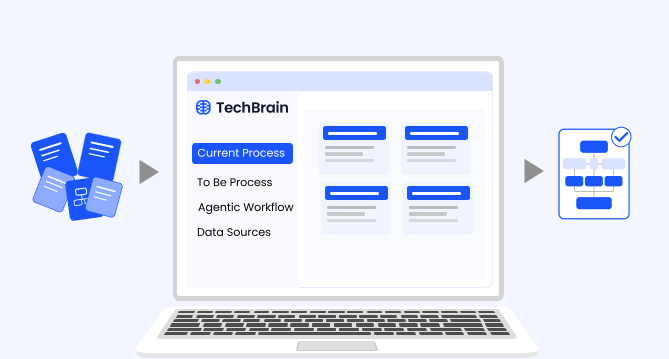
Why structured architecture design is the foundation of scalable enterprise systems
Structured architecture design guides enterprises from requirements to build-ready blueprints. Learn key principles, scalability gains, and TechBrain’s approach.
A guide to intranet search engine
Effective intranet search is a cornerstone of the modern digital workplace, enabling employees to find trusted information quickly and work with greater confidence.
Enterprise knowledge management guide
Enterprise knowledge management enables organizations to capture, organize, and activate knowledge across systems, teams, and workflows—ensuring the right information reaches the right people at the right time.
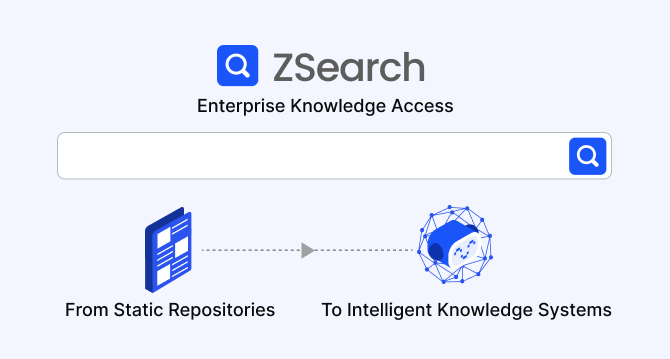
Company knowledge base: Why it matters and how it is evolving
A centralized company knowledge base is no longer a “nice-to-have” – it’s essential infrastructure. A knowledge base serves as a single source of truth: a unified repository where documentation, FAQs, manuals, project notes, institutional knowledge, and expert insights can reside and be easily accessed.
How agentic AI and intelligent ITSM are redefining IT operations management
Agentic AI marks the next major evolution in enterprise automation, moving beyond systems that merely respond to commands toward AI that can perceive, reason, act and improve autonomously.
A comprehensive guide to AgentOps: Scope, core practices, key challenges, trends, and ZBrain implementation
AgentOps (agent operations) is the emerging discipline that defines how organizations build, observe and manage the lifecycle of autonomous AI agents.
Adaptive RAG in ZBrain: Architecting intelligent, context-aware retrieval for agentic AI
Adaptive Retrieval-Augmented Generation refers to a class of techniques and systems that dynamically decide whether or not to retrieve external information for a given query.